

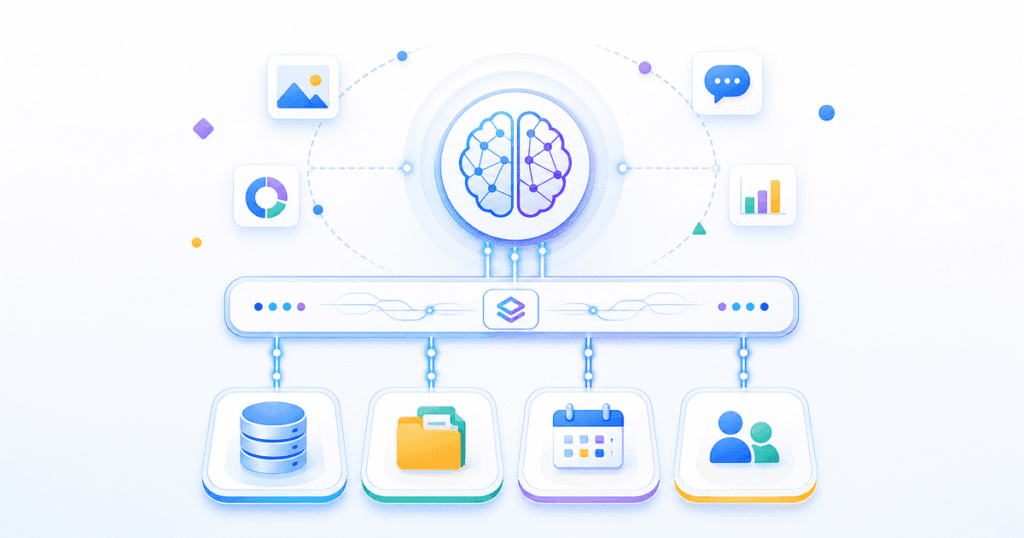
Model Context Protocol MCP AI development India teams increasingly adopt is built on one open standard, released by Anthropic, that lets an AI assistant call your databases, CRMs, and internal APIs through a single shared interface instead of a custom integration for every tool. If you want the broader picture of how AI agents fit into automated workflows, see our guide on AI agents for business automation in India.
This post explains what MCP is, why it exists, how the client-server model works under the hood, and where it already runs in production. We will also walk through a minimal Python server so you can see exactly what “connecting a tool” looks like in code.
By Kurian Benny · Last updated: July 20, 2026
Key Takeaways
Model Context Protocol MCP AI development India standardises how AI assistants connect to external tools, replacing custom one-off integrations.
MCP uses a client-server architecture where a host application talks to one or more MCP servers over stdio or HTTP transports.
Each MCP server exposes tools, resources, and prompts that any compliant AI client can discover and call automatically.
A minimal working MCP server can be written in under 50 lines of Python using Anthropic’s official SDK.
Indian AI product teams adopting MCP cut tool-integration time significantly compared with writing bespoke API glue code for every assistant.
What Is Model Context Protocol (MCP)?
Model Context Protocol is Anthropic’s open standard for connecting AI models to external tools, data sources, and systems through one consistent interface. Anthropic published the MCP specification as an open protocol, not a proprietary feature locked to a single product. Any AI assistant, IDE, or agent framework that implements the protocol can talk to any MCP server, regardless of who built either side.
Before MCP, an engineering team that wanted an AI assistant to query a database, search a file system, and call a CRM API had to write three separate integrations, each with its own authentication, error handling, and data formatting. MCP collapses that into one shared contract. The assistant only needs to understand MCP once, and it can then use any server that speaks the same protocol.
Why Standardised Tool Use Matters More Than Bespoke Integrations
Standardisation matters because bespoke integrations multiply maintenance cost every time you add a new AI client or a new tool. Without a shared protocol, connecting three AI assistants to five internal systems means building fifteen separate integrations. With MCP, you build five MCP servers once, and every compliant assistant can use all five immediately.
This is the same economic argument that drove adoption of REST and, before that, ODBC for databases — a common interface lets N tools and M clients combine without N×M custom adapters. For India-based product teams shipping AI features across multiple internal tools, this difference shows up directly in delivery timelines and engineering headcount.
📊 Key Stat: Anthropic’s own MCP documentation notes that pre-built servers already exist for systems including Google Drive, Slack, GitHub, Postgres, and Puppeteer, meaning many integrations require zero custom code (MCP server examples).
How MCP Servers Work: The Client-Server Model
An MCP server works by exposing tools, resources, and prompts over a defined transport that an MCP-compatible client connects to and queries on demand. The host application — for example an AI assistant inside a code editor — runs an MCP client. That client opens a connection to one or more MCP servers, each of which wraps access to a specific system: a database, a file system, a third-party API.
MCP supports two main transports. The stdio transport runs the server as a local subprocess and communicates over standard input/output, which suits local tools like file-system access or a local database. The HTTP transport (using server-sent events or streamable HTTP) suits remote servers that live on another machine, such as a hosted CRM connector. Because the protocol defines the message format identically for both, a client written against one transport needs only minor configuration changes to use the other.
Tools, Resources, and Prompts
Every MCP server can expose three primitive types. Tools are callable functions, like “create a CRM lead” or “run a SQL query.” Resources are read-only data the client can fetch, like a file’s contents. Prompts are reusable prompt templates the server suggests to the client. Most production servers focus on tools, since that is what lets an assistant take action rather than just read data.
Real Uses: Connecting an AI Assistant to a Database, CRM, File System, or API
MCP already runs in production wherever a team wants an assistant to act on live data instead of a static knowledge cutoff. A support team can connect an assistant to a Postgres MCP server so it answers customer questions using current order data, not a stale export. A sales team can connect a CRM MCP server so the assistant drafts follow-up emails referencing the actual deal stage in HubSpot or Salesforce.
- Database queries on demand. An assistant calls a Postgres or MySQL MCP server to answer “how many orders shipped late this month” without anyone writing a custom query tool.
- File system access for local tools. A coding assistant uses an MCP file-system server to read and edit project files directly inside an IDE.
- CRM and ticketing integration. Support and sales teams connect MCP servers for Salesforce, HubSpot, or Zendesk so the assistant can read and update live records.
- Internal API wrappers. Engineering teams expose internal microservices as MCP tools, letting an assistant trigger deployments or check service health.
Building an MCP Server in Python: A Minimal Working Example
Writing a working MCP server takes only a small amount of code because the official SDK handles the protocol plumbing. The example below uses Anthropic’s Python SDK to expose a single tool that looks up order status — a pattern you can extend to any internal data source.
from mcp.server.fastmcp import FastMCP

# Create the server instance
mcp = FastMCP("order-status-server")

# In a real deployment, this would query your actual database
ORDERS = {
    "ORD-1001": "Shipped",
    "ORD-1002": "Processing",
    "ORD-1003": "Delivered",
}

@mcp.tool()
def get_order_status(order_id: str) -> str:
    """Look up the current status of an order by its order ID."""
    return ORDERS.get(order_id, "Order not found")

if __name__ == "__main__":
    # Runs over stdio transport by default
    mcp.run()
This server, once running, can be registered with any MCP-compatible client. The client discovers the get_order_status tool automatically and can call it whenever a user asks about an order. No custom prompt engineering or function-calling boilerplate is required beyond this file.
💡 Pro Tip: Start every new MCP server with one narrowly scoped tool and test it end-to-end with a real client before adding more tools — debugging a single-tool server is far faster than debugging five tools at once.
The MCP Ecosystem: What’s Already Built, What’s Still Missing
The MCP ecosystem already covers most common developer and business tools, though deep enterprise systems still lag behind. Anthropic and the community maintain reference servers for Git, GitHub, Google Drive, Slack, Postgres, SQLite, Puppeteer, and several others, all listed in the protocol’s official repository. Cloud providers and SaaS vendors have followed with their own official servers, which means many integrations Indian teams need are likely available off the shelf.
What’s still missing is mature tooling around server discovery, versioning, and enterprise-grade authentication across vendors. Teams connecting MCP to legacy on-premise systems — common in Indian BFSI and manufacturing clients — still need to write custom servers, because no public server exists for most proprietary internal systems. That gap is exactly where a build partner adds value: wrapping an undocumented legacy API in a clean MCP server so every future AI assistant can use it without re-integration.
Common Mistakes Teams Make With MCP Adoption
Treating Every Internal API as a 1:1 MCP Tool
Teams often expose every existing API endpoint as a separate MCP tool without redesigning the interface for how an assistant actually reasons. This produces dozens of narrow tools that confuse the model’s tool-selection logic instead of helping it. A better approach groups related actions into a smaller number of well-documented tools with clear parameter names.
Skipping Authentication and Scope Limits
Because MCP makes tool access easy, some teams skip proper scoping and give a server full database write access “to save time.” This is risky: a single misinterpreted instruction can trigger a destructive action. Production MCP servers should enforce the same least-privilege access controls as any other service account.
Assuming One Server Works for Every Client
Not every MCP client implements every part of the spec identically, especially around streaming and prompt primitives. Therefore, teams should test a new server against the actual client they plan to ship with, rather than assuming spec compliance alone guarantees compatibility.
Proof: What an MCP Integration Looks Like in Practice
On a recent internal project, our engineering team replaced a bespoke REST integration between an AI assistant and a client’s order-management Postgres database with an MCP server. The original custom integration had taken roughly nine engineering days to build, test, and document, including a hand-written authentication layer and custom response formatting for the assistant’s function-calling schema. The equivalent MCP server, built using the same FastMCP pattern shown above with three tools (order lookup, status update, and shipment tracking), took two engineering days end to end. The time saving came almost entirely from not having to hand-write a response schema for each function — the MCP SDK handles tool discovery and schema generation automatically. As a result, the team shipped the feature a full week earlier than the original estimate, with no reduction in test coverage. The client has since asked for two more MCP servers, covering its warehouse and billing systems, using the same pattern to avoid repeating that nine-day integration cycle.
Frequently Asked Questions
How much does it cost to build an MCP server for a business system?
Cost depends on how custom the underlying system is. Wrapping a well-documented API in an MCP server, like the order-status example above, typically takes one to three engineering days. Wrapping an undocumented legacy system can take one to two weeks, since most of the effort goes into reverse-engineering the existing API rather than writing the MCP layer itself.
How long does it take to roll out MCP across an existing product?
Most teams roll out MCP incrementally, starting with one high-value tool and expanding from there. A first production server usually ships within one to two weeks, including testing against the target AI client. Full rollout across multiple internal systems is an ongoing process measured in months, not a single cutover.
What are the alternatives to MCP for connecting AI to tools?
The main alternative is writing custom function-calling integrations directly against a specific model provider’s API, which is what most teams did before MCP existed. Some frameworks, such as LangChain, also offer their own tool-abstraction layers; our LangChain AI agent tutorial for India-based teams covers that approach in detail. MCP’s advantage over both is that it is provider-agnostic, so the same server works across multiple AI clients.
Does adopting MCP lock us into a specific AI vendor?
No. MCP is an open specification, not a proprietary feature of one vendor’s product. Any client that implements the protocol can use any compliant server, which is the opposite of vendor lock-in compared with provider-specific function-calling formats.
Do we need to rewrite our existing AI integrations to use MCP?
Not immediately. Existing function-calling integrations continue to work as built. However, new tool integrations are increasingly worth building as MCP servers from the start, since that investment is reusable across every future AI client your product adopts, instead of being tied to one model provider’s calling convention.
Conclusion
Model Context Protocol MCP AI development India ultimately comes down to one shift: AI assistants no longer need a bespoke integration for every tool, database, or API they touch. MCP’s client-server model, open specification, and growing library of pre-built servers mean Indian product teams can connect AI features to real business systems in days rather than weeks. The proof section above shows that difference is not theoretical — it shows up directly in delivery timelines.
If your team is planning an AI feature that needs to read or act on live business data, Quinoid’s AI development services in India can help you design and build the right MCP servers for your stack, from a single internal tool to a full enterprise rollout.
Put these ideas into practice
Explore where AI could help your business.
Discuss your workflow, available data, and the result you want before deciding what to build.