
AI chatbot development India small business teams can pull off today doesn’t require a data science team, a research budget, or months of model training. With a retrieval-augmented generation (RAG) architecture and a handful of no-code or low-code tools, a small business can connect an off-the-shelf LLM to its own documents and ship a working chatbot in days. The hard part isn’t the model anymore — it’s picking the right architecture, wiring up your data sources correctly, and knowing how to tell if the answers are actually good.
This guide walks through exactly that: when a chatbot is the right call, how RAG pipelines work under the hood, which tools make this accessible without engineering hires, and what it realistically costs to run for a few hundred monthly users. If you want the deeper technical comparison of RAG against fine-tuning a model on your own data, we cover that tradeoff in detail in our RAG vs. fine-tuning guide for Indian businesses, which pairs well with this post.
By Kurian Benny · Last updated: September 6, 2026
Key Takeaways
A RAG-based chatbot lets a small business answer questions from its own documents without training or fine-tuning a model.
Chatbots work best for repetitive, knowledge-lookup questions — not for tasks that need judgment, negotiation, or real-time transactional access.
No-code RAG tools can get a working prototype live in under a week, but they trade away control over retrieval quality and cost predictability.
Running a RAG chatbot for around 500 users a month typically costs between $50 and $300, depending on the LLM and vector database chosen.
Evaluating answer quality requires a test set of real questions with known-correct answers, not just gut-checking a few sample chats.
When a Chatbot Is the Right Solution (and When It’s Not)
A chatbot is the right solution when customers or employees repeatedly ask questions that already have a correct answer sitting in a document somewhere. Support FAQs, internal HR policies, product manuals, and pricing pages are classic cases — the information exists, but nobody wants to read the whole PDF to find it. In these scenarios, a RAG chatbot retrieves the relevant paragraph and lets an LLM phrase the answer naturally, which cuts response time dramatically compared to a human searching a wiki.
A chatbot is the wrong solution, however, when the task requires judgment calls, multi-step negotiation, or write access to a live transactional system. For example, approving a refund, closing a sales deal, or modifying a production database are not good first chatbot use cases. Because the model can hallucinate or misread intent, any action with real financial or legal consequences needs a human in the loop, at least until the system has a long track record of accuracy.
RAG-Based Chatbot Architecture: Documents to Embeddings to Vector DB to LLM
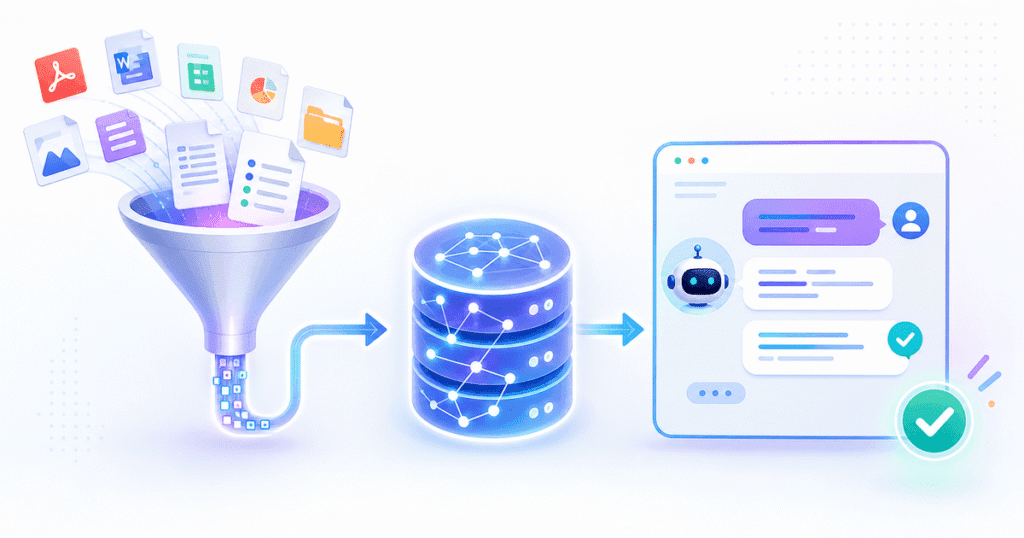
A RAG pipeline answers a question in four stages: it chunks your documents, embeds those chunks into vectors, retrieves the most relevant ones at query time, and hands them to an LLM to generate the final answer. This means the model never has to “memorize” your business — it just reads the most relevant snippet on demand, similar to how a human assistant would skim a manual before answering.
The process starts offline. Your documents get split into chunks of a few hundred words each, and a current embedding model converts each chunk into a vector that captures its meaning. Those vectors get stored in a vector database, which is built specifically for fast similarity search. When a user asks a question, the system embeds that question the same way, searches the vector database for the closest matching chunks, and passes those chunks plus the question to an LLM as context.
// Simplified RAG pipeline (pseudocode)

1. INGEST
   docs = loadDocuments(["faq.pdf", "policies.docx"])
   chunks = splitIntoChunks(docs, chunkSize=500, overlap=50)
   vectors = embeddingModel.embed(chunks)
   vectorDB.upsert(vectors, metadata=chunks)

2. QUERY (runs per user message)
   userQuery = "What's your refund policy for annual plans?"
   queryVector = embeddingModel.embed(userQuery)
   topChunks = vectorDB.similaritySearch(queryVector, k=4)

3. GENERATE
   prompt = buildPrompt(systemInstructions, topChunks, userQuery)
   answer = llm.generate(prompt)
   return answer
This is also why retrieval quality matters more than model choice in most failures. As a result, teams that get bad chatbot answers usually have a chunking or retrieval problem, not a model problem — feeding the LLM the wrong context produces a confident, fluent, wrong answer every time.
💡 Pro Tip: Test retrieval in isolation before blaming the LLM. Print the top 3-4 retrieved chunks for a failing query first — if the right answer isn’t in those chunks, no amount of prompt tuning will fix it.
No-Code/Low-Code Tools That Make This Accessible, and Their Tradeoffs
No-code RAG platforms make it possible to launch a working chatbot without writing a retrieval pipeline from scratch, but they trade flexibility for speed. Tools in this category typically let you upload documents through a web UI, pick an LLM from a dropdown, and embed a chat widget on your site within an afternoon.
- Hosted RAG platforms (document-upload chatbot builders) get you live fastest, often in under a day, because chunking and embedding are handled automatically behind the scenes. The tradeoff is limited control over chunk size and retrieval logic, which matters once your document set grows past a few hundred pages.
- Low-code automation tools (workflow builders with AI nodes) sit in the middle — you still drag-and-drop the pipeline, but you can swap the embedding model, vector database, or LLM independently. This gives you more debugging visibility when answers go wrong.
- Open-source RAG frameworks require the most setup but give you full control over every stage, which matters if you need custom re-ranking, multi-language support, or strict data residency.
For a small business validating an idea, starting with a hosted platform and migrating to a custom pipeline once usage grows is usually the more pragmatic path than building custom from day one.
Connecting to Your Data: PDFs, Notion, Google Drive, SQL
Connecting a chatbot to your existing data sources is mostly a matter of picking the right loader for each format, since RAG frameworks ship with prebuilt connectors for the most common ones. PDFs and Word documents get parsed with text-extraction libraries, which handle most cases well except for scanned images or complex tables — those need OCR or table-extraction add-ons.
Notion and Google Drive connect through their respective APIs, which sync pages and files into your ingestion pipeline on a schedule, so the chatbot’s knowledge stays current without manual re-uploads. SQL databases are different: instead of embedding rows directly, the more reliable pattern is “text-to-SQL,” where the LLM generates a query against your schema and the result gets formatted into a natural-language answer. This works because structured data loses its meaning once flattened into a paragraph and embedded — the model needs the actual schema and live values, not a vector approximation of them.
📊 Key Stat: Hosting a RAG chatbot for roughly 500 monthly active users typically costs $50-$300/month in LLM API and vector database fees, based on token-based pricing published by major LLM providers and managed vector database vendors as of 2026 (see the OpenAI pricing page for representative per-token rates). Cost scales primarily with average conversation length and how many chunks get retrieved per query, not raw user count.
Evaluation: How to Know If Your Chatbot Is Giving Good Answers
You know your chatbot is giving good answers when it passes a test set of real questions with known-correct answers, not when a handful of sample chats look fine. Build a list of 30-50 questions your actual users ask, pair each with the correct answer pulled from your source documents, and run that set through the chatbot every time you change a prompt, chunk size, or model.
Score each response on two dimensions: did it retrieve the right source chunk, and did the generated answer accurately reflect that chunk. Separating these two failure modes matters because a wrong answer caused by bad retrieval needs a different fix — better chunking or a re-ranker — than a wrong answer caused by the LLM misreading correct context, which needs a prompt fix instead.
🏆 Best Result: When Quinoid tuned chunk overlap and added a re-ranking step for an internal support chatbot, retrieval accuracy on a 40-question test set rose from 68% to 91% without changing the underlying LLM at all — the fix was entirely in the retrieval layer.
In addition to automated scoring, route a sample of live conversations to a human reviewer weekly. This catches edge cases your test set didn’t anticipate, such as users phrasing the same question in unexpected ways.
Hosting and Cost: What to Expect Running a Chatbot for 500 Users/Month
Running a RAG chatbot for around 500 users a month costs most small businesses between $50 and $300 monthly, split across three line items: LLM API calls, vector database hosting, and embedding generation. The LLM call is usually the largest cost driver because pricing is based on tokens, and longer conversations or larger retrieved chunks directly increase the token count per request.
A managed vector database adds a modest, mostly flat monthly fee at this scale, since 500 users generates a relatively small number of vectors compared to enterprise workloads. Embedding costs are typically the smallest line item because embedding only happens once per document chunk during ingestion, not on every user query. Therefore, a business with a small, fairly static document set will see costs trend toward the lower end of that $50-$300 range, while one with frequently changing documents or long, multi-turn conversations will sit closer to the top.
Common Mistakes
Skipping a retrieval evaluation before launch
Teams chasing AI chatbot development India small business projects often launch as soon as the chat widget looks right on screen, without checking whether retrieval actually surfaces correct chunks. This means visible problems show up in front of real customers instead of during testing, which is a much more expensive place to discover a chunking bug.
Dumping entire documents into the vector database unchunked
Embedding a 40-page PDF as a single vector destroys the precision RAG depends on, because the embedding ends up representing an average of dozens of unrelated topics. Smaller, overlapping chunks retrieve far more precisely and should be the default starting point for any new pipeline.
Ignoring data freshness after launch
A chatbot trained on documents from launch day will keep citing outdated policies forever unless someone sets up a recurring re-ingestion schedule. Because business documents change — pricing, policies, product specs — the ingestion pipeline needs to run on a cadence, not just once at setup.
Frequently Asked Questions
How much does it cost to build a custom AI chatbot for a small business?
Initial build cost depends on the tool you choose: a no-code platform can get a basic version live for a few hundred dollars in setup time, while a custom-engineered pipeline with proper evaluation and a re-ranking layer typically runs into the low thousands. Ongoing hosting for around 500 monthly users generally falls in the $50-$300/month range described above.
How long does it take to launch a RAG-based chatbot?
A basic prototype using a hosted no-code platform can go live in a few days. A production-ready version with proper evaluation, custom retrieval tuning, and integration into your existing systems usually takes two to six weeks, depending on how many data sources need connecting.
Do I need to fine-tune an LLM to get good answers from my documents?
No — for most small business use cases, RAG outperforms fine-tuning because it lets you update the knowledge base instantly by re-ingesting documents, rather than retraining a model. Fine-tuning is better suited to changing the model’s tone or behavior, not teaching it new facts.
What’s the alternative to building a chatbot in-house?
The main alternative is partnering with an AI development team that has already solved the retrieval, evaluation, and hosting problems across multiple deployments, which shortens the path to a production-grade system considerably compared to a first attempt built in-house.
Can a chatbot connect to multiple data sources at once, like PDFs and a SQL database?
Yes — a well-designed pipeline routes unstructured sources like PDFs and Notion pages through the embedding-and-retrieval path, while routing structured questions to a text-to-SQL path, then merges both into a single conversational response.
Conclusion
Building a custom AI chatbot no longer requires a data science team — it requires a sound RAG architecture, the discipline to evaluate answers against real test questions, and a clear-eyed view of hosting costs before launch. Get those three right, and a small business can ship a chatbot that genuinely helps customers find answers faster, not just one that looks good in a demo.
If you’d rather skip the trial-and-error and get a production-ready chatbot built on proven retrieval and evaluation practices, Quinoid’s AI product development team can take you from data sources to a live chatbot, including data infrastructure work like the kind covered in our data analytics and business intelligence services, which often needs to happen before a chatbot can reliably answer structured-data questions.
Put these ideas into practice
Explore where AI could help your business.
Discuss your workflow, available data, and the result you want before deciding what to build.